 DRAGON DETECTOR
VALLEYTECH / DETECTION / HUNT EDITION / 0.13.0
Carry your
radar.
Three radar themes. A little more awareness.
Axon priority alerts, signal hunts, and local history.
Your pocket radar, with evidence behind every match.
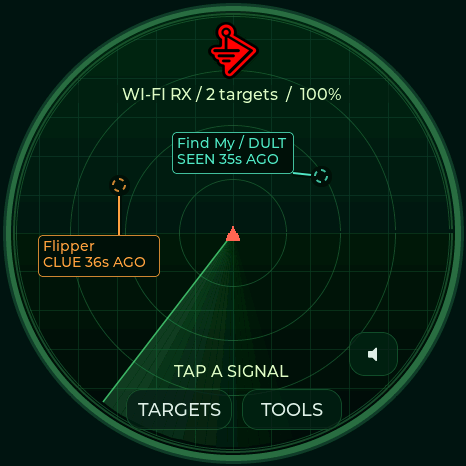
ACTUAL M5STACK DISPLAY RENDER · 0.9.1
Notice the signal.Fresh candidate signatures, with evidence.
Follow the change.Filtered RSSI and background-aware hunting.
Keep the evidence.Local history, watch lists, and USB CSV export.
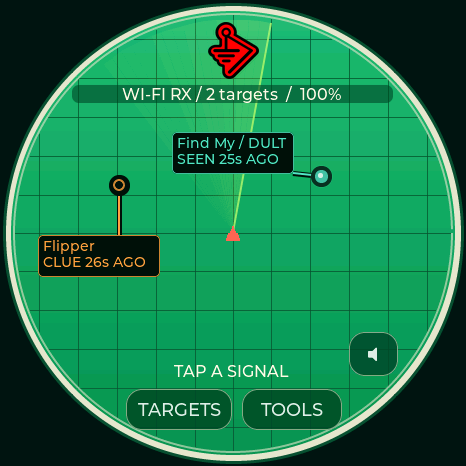
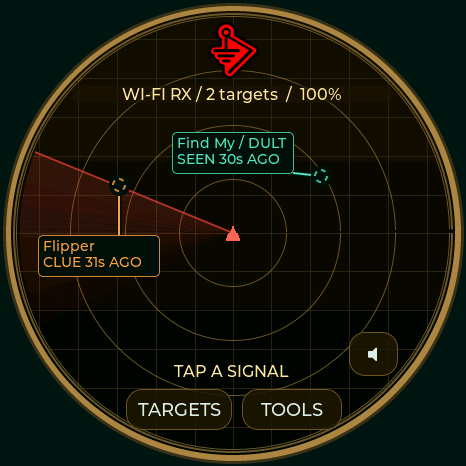
0.13.0 · Four-board radio and BLE lab. Waveshare AMOLED, M5Stack StopWatch, Spotpear and Seeed XIAO Round now share the 29 timed radio tests, GATT workspace, portal, connected-network tools and experimental CSI monitor. Tools now has a direct Attacks menu and a Utilities tab. New: HID report decoding, a GATT bridge with cached reads, saved recon sessions, AP archives and bounded recipes. Normal screens keep scanning. Update preserves badge and settings; every application retains at least 21% free space. Measured validation and hardware limits →
01 / GET STARTED
One radar. Five profiles.
Desktop Chrome or Edge · USB data cable
Select the exact board/display combination. XIAO uses its own 8 MB layout.
Choose Update matching Dragon Detector to preserve files and settings. Full-board labs are available in 0.13; Lite remains radar-only. This release was exercised on the connected Waveshare. Other board builds and their earlier hardware checks are documented in the validation notes.
Lite is a dedicated radar: full brightness, all detection families, one radar screen, no menus, badge mode or audio. Choose it only for Waveshare ESP32-S3-LCD-1.28, not the touch version, XIAO or 1.75C AMOLED. Lite hardware & recovery →
Choose your board above
Each model needs its own firmware. The ESP32-S3 chip check cannot identify your display wiring.
Select a board to load its release.
Connection & recovery
Close other serial monitors before connecting. On M5Stack StopWatch, hold the power button for about two seconds until the green LED lights, then release. On Spotpear/Waveshare/XIAO, hold BOOT, tap RESET, release BOOT, then reconnect. Select the matching USB port. A first installation initializes the badge filesystem; back up existing firmware before replacing it. Use Update only with this board's existing 0.3.x / 0.4.x / 0.5.x / 0.6.x / 0.7.x / 0.8.x / 0.9.x partition layout. XIAO Round updates require its own 0.9.2-or-newer 8 MB layout. Lite updates require the exact 0.9.4+ Lite layout; an older third-party port must be backed up and its partitions verified, or use Fresh installation. The Lite board uses its CH343 USB serial port. Reset after installation if the board stays in the bootloader.
02 / FIELD TOOLS
Keep your radar ready.
Firmware 0.4.x or newer · local USB connection
No account or cloud upload.
History & device controls
Connect to sync the UTC clock. Download detection history, return to the radar, or adjust display timers. Detection keeps running when the screen dims or turns off.
Connect a board running 0.4.x or newer. CSV contains the full stored evidence; display privacy only masks the device screen.
Display preferences
Radar appearance
Clock & utilities
Firmware 0.9.x–0.13.x. Stopwatch keeps running when you leave its page. M5Stack, Waveshare and Seeed XIAO Round use their RTC when detected; Spotpear uses a software clock until restart.
Connect firmware 0.9.x–0.13.x to read clock availability and saved orientation. UTC offsets are fixed; resync after daylight saving changes.
Fixed display orientation
Choose a fixed angle for your badge or desk. It is saved across restarts, and touch controls follow the display. Orientation changes only when you choose another angle.
03 / LISTEN TO THE SIGNAL
A sound for every signature.
Short, original alert melodies.
RTTTL settings saved on your detector.
Audio & foxhunting
Connect using Detector tools above. During a hunt, stronger signals produce higher, faster pulses. Axon has a double heartbeat; a falling two-note cue means the signal was lost. RSSI is not distance.
Focus follows the strongest matching candidate with switching hysteresis. Flock focus also includes ALPR vendors and Raven. A manually selected Hunt target takes priority. Quiet mode mutes automatic audio.
Speaker output requires working audio hardware. Seeed XIAO Round has visual alerts and on-screen hunting. Waveshare Lite has visual radar alerts only.
Device alert editor
Format: name:d=duration,o=octave,b=tempo:notes. Up to 512 characters, 96 notes, 15 seconds; octaves 4–7. Use p for a rest and # for a sharp. Leave blank to silence this family’s alert melody. Saving does not play it.
Preview plays once at the selected device volume, including in quiet mode. The master switch controls automatic alerts. No browser or cloud audio upload is needed.
FOUR FULL BOARDS / 0.13.0
Choose your mission.
Focused radar modes, Wi-Fi and BLE surveys, 29 timed transmission tools, and capture storage. Connect with Detector tools above. Active tests pause radar; Stop restores the previous listening state.
Listening modes
Passive mode selection persists. Recordings and tests always require Start.
Target selection
Refresh after a channel sweep. APs and clients must have been observed within 30 seconds.
Timed radio tests
BLE payload updates are capped at 10 per second. Driver-accepted counts do not prove delivery or effect. Use a network and devices you are authorized to test.
Up to 32 unique entries, retained in recon flash across restarts and updates.
CSI signal monitor · 0.11+
Select a fresh AP above, place the detector still, then calibrate for 30 seconds. This experimental monitor measures changes in the Wi-Fi signal path; it does not identify people or guarantee occupancy detection. Sparse traffic shows LOW DATA. It pauses radar until Stop, Home, or the 15-minute limit.
Wi-Fi analysis
EAPOL M1–M4 counts are observations, not proof of a complete handshake. Probe SSIDs are requested networks, not the sender's identity.
Portal / KARMA lab · 0.11+
A timed local AP with captive DNS and a test page. Choose your test SSID directly or select a recently observed probe request. Review the name before starting. No Internet routing or automatic disconnect attack is performed.
Test submissions remain uncensored in RAM or a saved CSV. Use invented values for demonstrations. Saved logs download through Capture studio.
Capture studio
RAM capture buffer (Waveshare 2 MiB, M5Stack/Spotpear 1 MiB, XIAO 512 KiB); stops when full. Wi-Fi uses Radiotap PCAP; BLE uses raw advertisement CSV. No connected BLE traffic is captured. Save after stopping to retain a recording across reboot.
Connected network · 0.11.1+
Join a 2.4 GHz network you configure, inspect its IP details, and check local hosts. Joining pauses radar until Disconnect, Home, connection loss, or the 15-minute limit. Saved passwords stay on the detector in unencrypted NVS; they are never returned by the profile list. The detector never connects automatically.
Scans check at most 254 local addresses, at no more than four requests per second. A device may ignore ping; no response does not mean it is offline. Save or clear the current results before starting another scan.
Saved sessions, surveys and recipes · 0.13
Recon session
Record one protocol while the current radio schedule continues. Stop before download. Each ZIP includes a manifest and RCN1, PRB1 and REL1 logs. No GPS fix is fabricated. Compatible probe records retain the first 24 SSID bytes; Notebook CSV retains up to 32.
AP survey archive
Save current AP names, addresses, channels, security and signal readings. Loading an archive displays historical observations; it does not select a live target.
Generated frame source
Optional source MAC for generated Wi-Fi frames. Clone and AP-directed frames retain their protocol-specific addresses. Resets at restart.
Recon recipe editor
Up to 24 steps and 512 ASCII bytes. Recipes never run at boot. WAIT is cooperative; Home or Stop cancels. TOOL steps use the current fresh target and finish before advancing. Commands and limits →
Connect a full board running 0.13.0 to begin.
Every build reserves at least 21% of its application slot. User-data usage varies by device; the 32 MB Waveshare retains separate badge and recon storage. Memory report and remaining feature work
PASSIVE RECON / ALL FOUR FULL BOARDS / 0.12
See the evidence.
Connect in Detector tools. Probe names, BLE payloads, protocol counters and 40,333 IEEE vendor prefixes. Badge, menus, hunting and notebook downloads keep both radios scanning. A selected radio mode can intentionally specialize reception.
Connect in Detector tools to inspect or download.
Up to 96 entries per table in RAM. Export before powering off. SSIDs and advertisements are hex encoded to preserve exact bytes; a changing payload does not establish a new device. Vendor registration does not establish a product or intent. Lite keeps its radar-only interface.
BLE LAB / ALL FOUR FULL BOARDS
Explore. Capture. Emulate.
Use 0.13 on any full board, or 0.9.8+ on Waveshare AMOLED. Connect in Detector tools above. Explicit GATT connections, bridges and emulation pause reception; Stop restores radar. Waveshare has a dedicated 16 MB recon partition; other full boards share protected user storage.
Peripheral inspector
Choose a device you own or have permission to inspect. Non-connectable adverts and private addresses that have rotated may not accept a connection. Protected reads remain marked as unavailable.
HID decoding and GATT bridge · 0.13
Select a captured HID Report Map characteristic to inspect fields or decode a report. The report ID and direction come from its Report Reference descriptor; GATT report bytes exclude the ID. Unsupported layouts stay raw.
GATT bridge
Connect and discover a complete profile first. The bridge forwards local writes and remote notifications for up to ten minutes. Reads use cached values. Local write acknowledgement does not prove remote success; inspect the error counter. Protected access still requires the peer's permission. Disconnect or Stop restores radar.
Connect a supported full board to begin.
Pairing & security · 0.11+
Configure before connecting. Pairing is off at boot. Numeric comparisons require your confirmation; no default PIN is submitted. Enable bonding only when you want pairing keys stored on the detector.
Profile library
GATT emulation
Recreates application services, characteristics, readable values and descriptors. Legacy advertisements are reused when they fit. The detector keeps its own BLE address. Pairing keys, protected permissions and proprietary device logic are not cloned. Writes affect this local test peripheral only.
Upgrading from 16 MB firmware
The lower 16 MB keeps the existing settings, badge and history layout. If Status reports storage=0 after an update, initialize the new upper partition once. It does not erase the badge or settings; it replaces any old data in the previously unused upper half. Make a full backup first if that space was used by another firmware.
FOUR FULL BOARDS / ADVERTISEMENT WORKBENCH
Build a BLE test.
29 timed radio tools now include iBeacon, Eddystone UID, Eddystone telemetry, BTHome and a custom legacy payload. Use Radio tools to choose duration and rate, review the test, then start. Stop or timeout restores detection.
Prepare a payload, then select its test in Radio tools.
This only prepares RAM. Select “BLE custom advertisement” in Radio tools to transmit from the detector’s own identity. BLE tests are limited to 10 updates/second and 60 seconds.
04 / MAKE IT YOURS
Your art. Your badge.
Crop locally in your browser.
Your image goes directly to your board over USB.
1 Choose your display
Preview any full-feature board now. Connecting USB selects and locks the detected model. Lite has no badge mode.
2 Make it fit
Fine positioning
Add text to your image
Text is included in the saved image and preview download. Clear the text box for an image-only badge.
3 Wear your badge
Connect current Dragon Detector firmware. Upload saves the image on your device; scanning continues in badge mode.
Hold the displayed badge to open tools. Choose Show radar in Detector tools to return to scanning view.
KNOW WHAT YOU’RE SEEING
Evidence, at a glance.
Looks for Flock, Axon, Raven, camera glasses, Find My and Google Find Hub accessories, SmartTags, Tile, Ring/camera/ALPR vendor candidates, drone Remote ID, Flipper, Wi-Fi Pineapple, Pwnagotchi, Nyanbox, Biscuit, and Wi-Fi deauthentication/disassociation and BLE spam candidates. A match does not establish malicious intent, recording state, or a device's owner.
AirTag and Biscuit Pro/Ultra models cannot always be distinguished. RSSI is signal strength, not distance; the radar angle is decorative. Silent radios and 5/6 GHz devices remain outside coverage.
Read the detection evidence →Check your Flipper or Pineapple Pager →
Radar, hunt & traffic guide →